Table of Contents
Overview
Stellar Converter for EDB is a dedicated EDB to PST conversion tool from Stellar. Its purpose is straightforward: read an offline or hosted Exchange Database (EDB) file and convert mailbox content into Outlook PST files, or export it directly to a live Exchange Server or Microsoft 365 tenant.
For Exchange administrators, the practical value comes in situations where native methods fall short particularly when PowerShell cmdlets like New-MailboxExportRequest fail on disconnected or orphaned mailboxes, when an old EDB cannot be accessed through Database Portability or when public folders need to be exported to PST, which the Exchange Admin Center does not natively support.
This review covers one of those real-world scenarios, followed by a walkthrough of the conversion steps, key features, pros and cons, and a summary for IT decision-makers.
The Scenario: PowerShell Export Failing on Disconnected Mailboxes
A compliance request came in requiring PST exports of several mailboxes including two from recently offboarded employees whose AD accounts had already been removed. With the accounts deleted, the mailboxes were in a disconnected state. Running New-MailboxExportRequest against them returned errors each time, and reconnecting the accounts temporarily just to run an export introduced more steps and risk than the task warranted.
Stellar Converter for EDB offered a direct path. I pointed the tool at the live EDB file on the mailbox server. No Active Directory connection was required the software reads the EDB directly and surfaces all mailboxes, including disconnected ones, in its interface. I located the two mailboxes in question, applied an 18-month date filter as the compliance team specified, and initiated the PST export.
The database was approximately 7.25 GB. The scan completed in around 5 minutes, and the export of the two filtered mailboxes finished in under 10 minutes. The resulting PST files opened cleanly in Outlook folder hierarchy intact, all message headers and attachments present, timestamps accurate. What would have required a more involved workaround through native tools was resolved in a single straightforward workflow.
Steps to Convert EDB to PST Using Stellar Converter for EDB
The following steps reflect the actual workflow in the software’s interface:
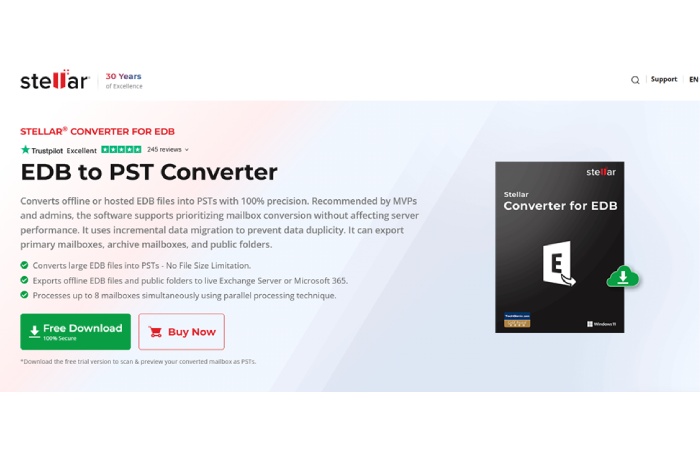
1. Download and Install
Download Stellar Converter for EDB from the Stellar website. Install it on any Windows machine no Exchange Server installation or Active Directory access is required on the machine running the software.
2. Launch and Select EDB File
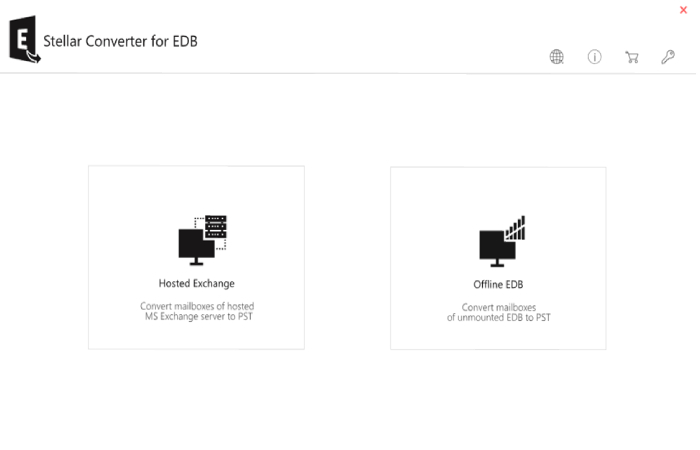
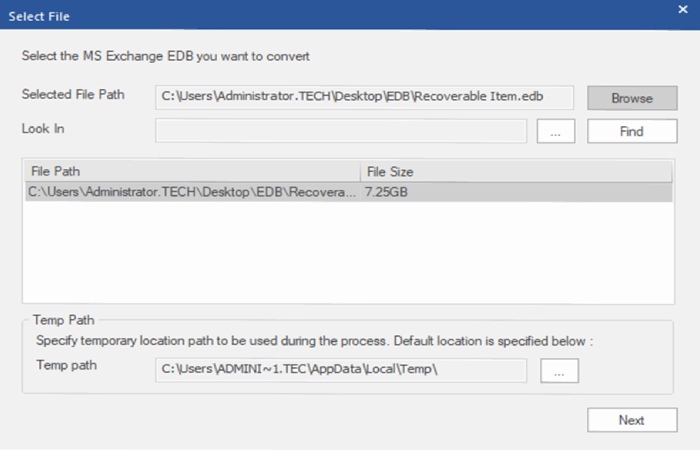
Open the application. On the home screen, click Browse to locate the EDB file. The software supports both offline EDB files and hosted/live Exchange databases.
3. Scan the Database
Click Convert to begin the scanning process. The software indexes all mailbox content within the EDB. A real-time progress bar tracks the scan. Scan time varies depending on database size a 7.25 GB database scanned in approximately 10 minutes in our test.
4. Preview Mailbox Content
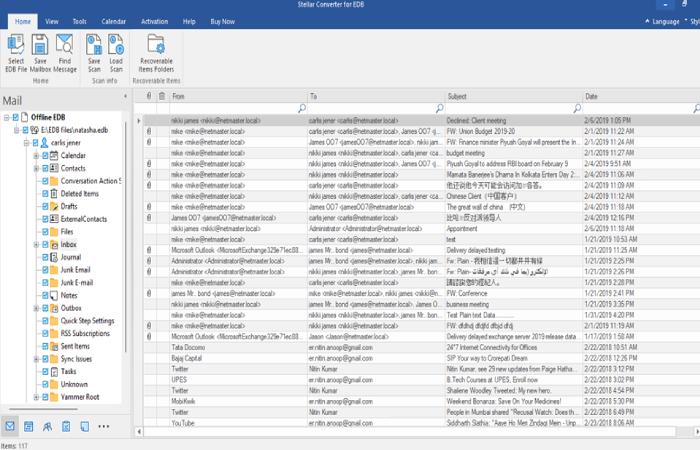
Once the scan completes, the software displays all mailboxes in an expandable tree on the left panel. Click into any mailbox or folder to preview individual emails, attachments, calendar entries, contacts, tasks, and notes in the reading pane before committing to export.
5. Select Mailboxes and Apply Filters
Check the mailboxes or specific folders you want to export. Use the date range filter to narrow the export to a specific time window if needed. This avoids exporting an entire database when only a subset of data is required.
6. Choose Export Destination
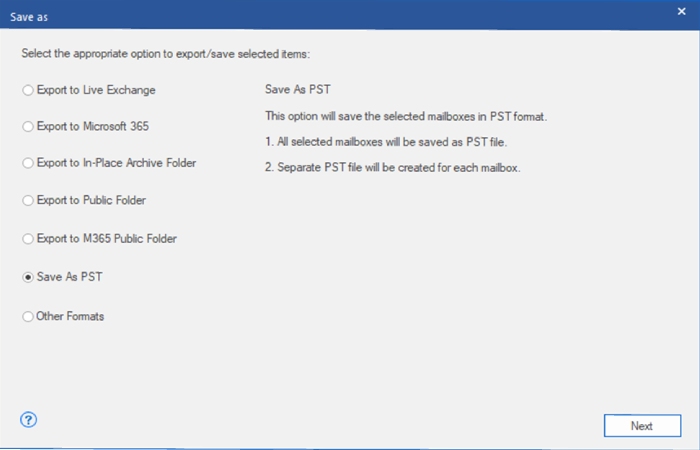
Click Save and choose your export format: PST file, live Exchange Server, or Microsoft 365. For PST export, select a destination folder. The software also offers an option to auto-split large PST files by size to keep them manageable in Outlook.
7. Run the Export and Verify
Initiate the export. A progress indicator shows export status per mailbox. Once complete, the software generates an export log. Open the PST in Outlook to verify that folder structure, items, and metadata are intact.
Key Features of Stellar Converter for EDB
- Converts Offline EDB Files Without Exchange Server. The tool operates independently of any Exchange environment. No Exchange Server installation, no Active Directory connection, no MAPI dependencies required on the host machine.
- Exports to PST, Live Exchange, and Microsoft 365. Three export destinations are supported from a single interface. Useful for teams exporting to Outlook archives, populating mailboxes on a live Exchange server, or onboarding to M365.
- Supports All Major Exchange Server Versions. Compatible with Exchange Server 5.5, 2000, 2003, 2007, 2010, 2013, 2016, 2019, and Exchange Server SE.
- Public Folder Export to PST. Public folders from the EDB including nested hierarchies can be exported to PST. This fills a gap in Exchange’s native tooling, which does not allow public folder PST export via PowerShell or EAC.
- Preview Before Export. A full mailbox preview is available after scanning. Emails, attachments, calendar items, contacts, notes, and tasks are all viewable before any export is initiated.
- Selective Export with Date Filtering. Exports can be scoped to specific mailboxes, individual folders, or date ranges. Avoids unnecessary bulk exports when only targeted data is needed.
- Parallel Processing for Bulk Jobs. Up to 8 mailboxes can be processed simultaneously, reducing total export time on large databases with multiple mailboxes.
- Incremental Export to Prevent Duplicates. When exporting to M365 or a live Exchange target, the tool uses an incremental approach that skips items already present in the destination, preventing duplicate data.
- Auto-Split PST by Size. Large mailboxes can be automatically split into multiple PST files of a defined size during export, keeping files within Outlook’s practical limits.
- Archive Mailbox and Primary Mailbox Support. Both primary and archive mailboxes within the EDB are accessible and can be exported independently or together.
Pros and Cons
Pros
- No Exchange dependency. Works on any Windows machine without Exchange Server installed. Reduces infrastructure overhead for one-off export jobs.
- Public folder PST export. A capability that is simply not available through Exchange’s own tooling fills a real gap.
- Broad version compatibility. Exchange 5.5 through Exchange Server SE means legacy EDB archives from older environments are accessible without spinning up period-correct infrastructure.
- Preview before committing. Verifying mailbox content before export reduces errors and is essential for compliance-driven export workflows.
- Selective and filtered exports. Date range and folder-level selection avoid unnecessary bulk conversion and save significant time on large databases.
- Clean, wizard-driven interface. No steep learning curve. Admins unfamiliar with the tool can navigate the workflow without consulting documentation.
Cons
- Export requires a paid license. The free trial enables full scanning and mailbox preview but blocks actual PST or M365 export. For a one-time job, the cost may feel disproportionate, though the preview at least confirms data is accessible before purchasing.
- Windows only. The software runs exclusively on Windows. Not a practical constraint for most Exchange environments, but worth noting.
Summary for IT Decision-Makers
Stellar Converter for EDB is a purpose-built EDB to PST Converter tool. It occupies a specific, well-defined space: converting EDB mailbox content into accessible formats when native Exchange export methods are unavailable or impractical.
The clearest return on investment comes in three situations that most Exchange environments encounter at some point: PowerShell export jobs that fail on disconnected or orphaned mailboxes, access to legacy EDB archives that cannot be mounted on current Exchange versions, and public folder exports that Exchange’s own tools do not support.
For organizations still running on-premises Exchange particularly those managing Exchange 2013, 2016, or hybrid environments this tool closes a genuine operational gap.
A free trial with full preview capability is available, which means the software can be evaluated against your actual EDB before any purchase decision is made. For IT managers weighing the cost, that preview step is worth doing first if the content is there and accessible, the tool earns its price quickly.
Verdict: Recommended for Exchange administrators who need reliable EDB to PST conversion outside of native tooling. Focused scope, solid execution, no unnecessary complexity.
Overall Rating: 4.5 / 5