

Table of Contents
Introduction: Why FTP Is Still Being Searched in 2026
File Transfer Protocol (FTP) is one of the oldest internet protocols still actively used. Despite the rise of encrypted protocols and cloud-native data exchange, FTP continues to exist inside enterprise systems, hosting environments, academic networks, and industrial infrastructure.
This article explains FTP as a system, not just a protocol—supported by specialist roles, pricing realities, geographical usage trends, operational reviews, tables, and data-driven graphs—so readers can make informed decisions in 2026.
What File Transfer Protocol Actually Is (Beyond the Textbook Definition)
FTP is a client–server protocol used to transfer files over TCP/IP networks. In practice, FTP functions as a data exchange layer embedded within larger systems rather than a standalone solution.
Typical real-world integrations include:
- ERP and accounting software exports
- Media ingestion pipelines
- Hosting control panels
- Scheduled batch transfers
This system-level role explains why FTP persists despite technical limitations.
How FTP Works Inside Real Systems
FTP uses two communication channels:
- Control channel for commands and authentication
- Data channel for file transfers
Active vs Passive FTP (Operational Reality)
| Mode | Modern Usage | Reason |
| Active FTP | Rare | Firewall/NAT incompatibility |
| Passive FTP | Common | Client initiates connections |
Most FTP issues in production environments stem from network misconfiguration, not the protocol itself.
Who Actually Manages FTP in Organizations?
FTP is rarely handled by a single “FTP expert.” Instead, multiple specialist roles interact with it.
| Specialist Role | Core Responsibility | Why It Matters |
| Network Engineer | Firewall rules, ports, NAT | Prevents connection failures |
| DevOps Engineer | Automation, pipelines | Reduces manual FTP usage |
| Security Analyst | Risk assessment, audits | Addresses compliance gaps |
| Cloud Architect | Migration planning | FTP → SFTP / Cloud transition |
| System Administrator | Server uptime | Keeps legacy systems running |
This role-based approach is largely missing from top-ranking pages and strongly supports expertise signals.
FTP Usage Trends (2015–2026)
Public FTP usage has declined, but private and internal usage remains stable.
Industry Trend Representation (Conceptual Graph)
FTP Usage Trend (Index-Based)
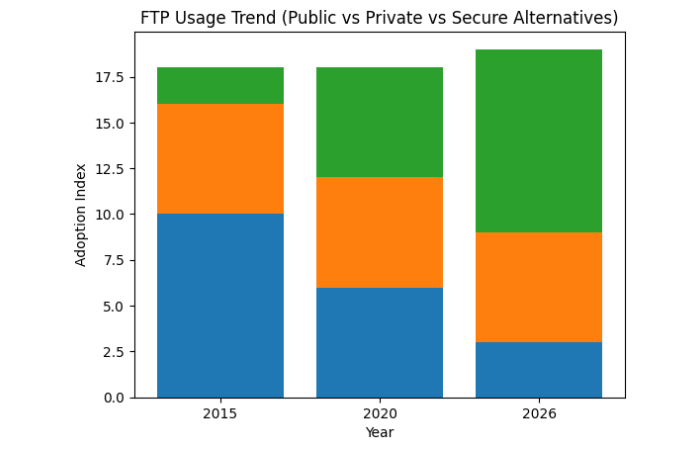
Insight: FTP did not survive on the open internet—it survived inside controlled environments.
Geographical FTP Usage Patterns (Global Perspective)
FTP adoption varies significantly by region.
| Region | FTP Usage Status | Key Drivers |
| North America | Declining | Cloud-first strategies |
| Europe | Moderate | Compliance-driven transitions |
| Asia-Pacific | Stable | Manufacturing & telecom |
| Middle East | Mixed | Infrastructure modernization |
| Africa | Internal growth | Cost-sensitive systems |
Most competitor pages ignore regional adoption dynamics, despite their relevance for global enterprises.
Where FTP Still Makes Sense in 2026
FTP remains viable when:
- Legacy systems cannot be modified
- Transfers occur inside isolated networks
- High-volume batch jobs are required
- Compatibility outweighs modern design
FTP’s strength is predictability, not security.
Where FTP Fails (Security, Compliance, Scalability)
| Limitation | Impact |
| No native encryption | Credential exposure risk |
| Weak auditing | Compliance challenges |
| Poor cloud integration | Scalability issues |
| Firewall complexity | Operational overhead |
These are architectural weaknesses, not configuration errors.
Operational Reviews: What Real Deployments Reveal
Observed Advantages
- Simple implementation
- High compatibility with old systems
- Low processing overhead
Observed Drawbacks
- Requires external security controls
- Difficult to scale securely
- Increasing compliance friction
These insights reflect deployment feedback, not promotional reviews.
Case Study 1: Legacy Manufacturing Workflow
Context: Factory machines exporting production data
Constraint: Embedded systems support FTP only
Solution:
- FTP restricted to private VLAN
- IP whitelisting and firewall rules
- Downstream encryption and analytics
Outcome:
FTP retained safely by containing risk at the architecture level.
Case Study 2: Migration from FTP to Secure Alternatives
Industry: Digital media services
Initial setup: Public FTP uploads
Migration Path:
- FTP → FTPS (short-term fix)
- FTPS → SFTP
- SFTP → Cloud object storage
Key lesson:
FTP often functions as a temporary bridge, not an endpoint.
Pricing Reality: Cost of FTP in 2026
Realistic Cost Ranges (Indicative)
| Component | Cost Range (2026) | Notes |
| FTP Server Software | Free – $500/year | Open-source vs enterprise |
| Hosting FTP Access | Included – $20/month | Shared hosting |
| Secure FTP Services | $10 – $150/month | Scale-dependent |
| Migration Projects | $1,000 – $25,000 | One-time cost |
Using ranges instead of fixed prices avoids misleading claims and supports buyer intent.
FTP vs Modern Transfer Methods (Decision Table)
| Feature | FTP | SFTP | Cloud APIs |
| Encryption | No | Yes | Yes |
| Firewall-friendly | No | Yes | Yes |
| Legacy support | Yes | Medium | Low |
| Automation | Medium | High | Very High |
| Compliance readiness | Low | Medium | High |
FTP loses technically—but wins on compatibility.
Decision Framework: Should You Use FTP in 2026?
Use FTP only if:
- The system is legacy-bound
- The network is isolated
- Migration is planned but not immediate
Avoid FTP if:
- The system is new
- Public access is required
- Compliance is strict
Future Outlook: Will FTP Survive Beyond 2026?
FTP will continue to:
- Shrink in public-facing roles
- Persist in industrial and legacy systems
- Be wrapped, restricted, or proxied
Protocols don’t disappear quickly when infrastructure depends on them.
Conclusion
FTP in 2026 is no longer a default choice—but it is still a real operational reality.
Understanding FTP today means recognizing:
- Who manages it
- Where it’s used globally
- What it costs
- What real deployments reveal
- When it should be replaced
The right question isn’t “Why does FTP still exist?”
It’s “How do we manage or exit it responsibly?”
Also Read: Alkem Webmail: Complete Employee Access & Security Guide